

 +370 5 210 70 50



Payment methods

JUDU app
Manage your parking anytime – start and stop it with just a few taps. Receive reminders before your parking session ends and avoid unnecessary costs.

via SMS
You can conveniently and quickly pay for vehicle parking by sending an SMS from your mobile phone to 1332.
Important: You can pay for parking by sending an SMS only if you have a Lithuanian phone number

Parking meters
You can pay for vehicle parking using the parking meters located in the paid vehicle parking spaces. You can pay for parking at parking meters using a contactless payment card or cash.
You can pay for on-street parking using partner apps: UNIPARK →, ParkMan → ir carOne →
How to pay for a month of parking in a parking zone?
You can pay the monthly fee quickly and conveniently at JUDU self-service terminals and JUDU Customer Service Centres.
How to pay for the resident’s permit?
You can pay for a residential permit quickly and conveniently online by logging in to the central e-services portal, the eGovernment Gateway, the JUDU self-service portal, or at JUDU Customer Service Centres.
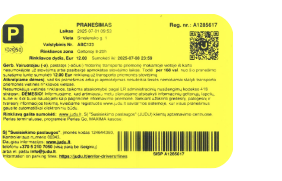
What should you do if you did not pay, or paid the local parking fee late?
If the local fee is not paid immediately or if the additional payment of the local fee is delayed and notice is received, the designated local fee must be paid within 168 hours from the end of the day when the notice was issued. Use the methods specified below, ensuring to provide the national registration number of the vehicle and the registration number of the received notice.
After entering the vehicle registration and the notice registration number, the system will automatically display the amount of local fee to be paid. The fee depends on the paid parking zone in which the vehicle was parked:
Green zone
5 €
Yellow zone
12 €
Red zone
35 €
Blue zone
96 €
Where to pay the fee after receiving a notice?

E-Government Gateway
After receiving a notice, the designated local fee can be quickly and easily paid here or by connecting to the central service portal E-Government Gateway →
PERLAS terminals or Perlas Go app
In cash at all PERLAS terminals in Lithuania (except PC “Maxima”) or with a credit card in the Perlas Go mobile app.

JUDU Customer Service Centres
After receiving a notice, you can pay the fee quickly and conveniently at JUDU Customer Service Centres →

MAXIMA store checkouts
After receiving a local parking fee notice, you can pay in cash or by bank card at the checkout of any MAXIMA store.
Information for providers on toll collection
We would like to kindly remind you that the local fee is a mandatory payment established by the ruling of Vilnius City Municipality Council for owners (drivers) of all categories and classes of motor vehicles and their trailers. It is valid in the territory of Vilnius City Municipality. Since it does not meet the requirements for the provision of products or services specified in the Law on Value Added Tax, VAT invoices are not issued. More information about the procedure for issuing VAT invoices can be found here (in Lithuanian only).
Parking in Vilnius
JUDU self-service
Išsiimkite parkavimo leidimus bei apmokėkite gautus pranešimus
JUDU app
Download the JUDU app and pay for car parking in just a few taps
Parking in parking lots
Don’t want to park on the street? Choose car parks located in and around the city centre, open 24/7.
On-street parking zones
Parking in Vilnius city centre and the Old Town is paid and is divided into four zones: blue, red, yellow, and green